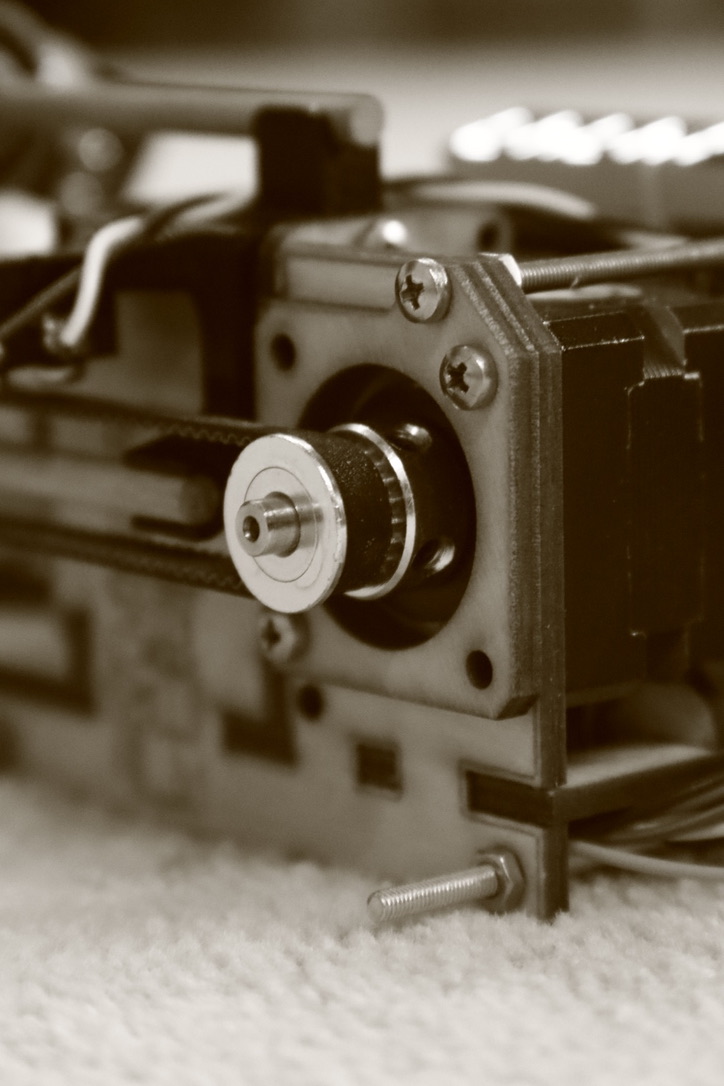
Egg Lathe
Egg Lathe is a CNC-style automation system for traditional Ukrainian egg dyeing (Pysanky). The project combines custom mechanical hardware, embedded firmware, and a Python control application to enable precise, repeatable patterning on the curved surface of an egg.
Overview
The Egg Lathe is an automated take on traditional Ukrainian egg dyeing (Pysanky). The system allows intricate, repeatable designs to be “printed” onto the surface of an egg using a CNC-style workflow.
The project spans three tightly integrated domains:
- Mechanical hardware
- Embedded firmware
- Desktop software
Hardware
The frame is primarily constructed from laser-cut wood (4.175 mm draftboard and plywood) secured with M2.5 and M3 fasteners. Additional components are 3D printed using a Prusa MK3S+ with PLA filament.
Two NEMA-11 stepper motors provide 2-axis motion:
- Rotary axis: rotates the egg axially
- Linear axis: moves the tool carriage parallel to the egg’s axis via a belt drive
The egg is held between two 3D-printed friction mounts:
- One fixed to the rotary motor shaft
- One free-spinning mount supported by bearings
The free mount is spring-loaded along an 8 mm aluminum rod, allowing adjustable holding pressure for eggs of varying sizes.
Electronics are driven by an Arduino/STM32-class microcontroller, chosen for simplicity, cost, and available IO.
Firmware
The firmware runs on a microcontroller and exposes a small, explicit command protocol over USB serial. It handles:
- Stepper motor control (rotary + linear)
- Calibration and homing
- Execution of queued motion commands
- Reporting command completion back to the host
This layer abstracts low-level motion while remaining deterministic and debuggable.
Desktop Software & Control Stack
Overview
Egg-Lathe is my end-to-end attempt to automate Ukrainian egg dying (Pysanky) using a custom-built CNC-style lathe. The project spans hardware design, embedded firmware, and a desktop control application that can both simulate and drive the physical machine to draw programmable patterns around an egg.
Role & Context
I built this as a personal side project to explore the full stack of a mechatronics system:
- Mechanical design in CAD and laser-cut parts
- Embedded control on a microcontroller-based lathe
- A host-side Python application with a GUI, pattern generation, simulation, and serial control
I owned the design and implementation across hardware, firmware, and software.
Tech Stack
- C / C++ (embedded firmware, Arduino/STM32-style code)
- Python (control application, pattern generation, simulation, tooling)
- Shell (batch execution scripts and helpers)
- PyQt5 (desktop GUI)
- PySerial (serial communication with the lathe)
- NumPy, Pillow, Matplotlib, SciPy (image and data processing, visualization)
- Turtle / Pygame (2D preview / simulation experiments)
- Fusion 360 (mechanical CAD)
- SVG toolchain + laser cutting (hardware fabrication)
Problem
Traditional Pysanky decoration is slow, highly manual, and difficult to reproduce exactly, especially for complex, banded, or algorithmic patterns. I wanted a system that could:
- Hold and rotate an egg precisely
- Move a tool linearly along its surface
- Accept higher-level “patterns” (sine bands, grids, zig-zags, etc.)
- Simulate designs before committing them to a fragile egg
- Be extendable toward image-based, single-line art around the egg
The challenge was turning high-level pattern descriptions into robust motion control on inexpensive hobby-grade hardware.
Approach / Architecture
I split the system into three main layers:
Hardware (Lathe)
- Custom laser-cut frame with chucks, bumpers, and slides for the egg and tool.
- Stepper-driven rotation (egg) and linear axis (tool), designed in Fusion 360 and exported to SVG for laser cutting.
Firmware (Microcontroller)
- A small command protocol over serial with explicit prefixes and completion markers.
- Commands like calibration, X/Y movement, and wait/break-wait, abstracted behind short, parseable tokens.
Desktop Application (Host)
- A Python application that:
- Generates pattern commands as high-level objects (
SineBand,ZigZagBand,Circle,Band, etc.). - Compiles them into low-level serial commands using a
Command+Queueabstraction. - Provides a PyQt GUI for connection, movement control, pattern execution, and simulation/preview.
- Generates pattern commands as high-level objects (
- A Python application that:
Around this, I experimented with image-based pattern generation (stippling, Bezier-curved single-line drawings) that could eventually map 2D art onto the egg surface.
Key Features
- Programmable pattern primitives (
SineBand,ZigZagBand,Circle,Band) that compose into complex designs. - Serial command abstraction (
Command/Queue) with automatic position tracking and layering. - PyQt-based control UI with movement controls, connect/simulate buttons, and a preview area.
- Simulation of motion paths using Turtle/Pygame and on-screen previews before running on hardware.
- Hardware design exported from Fusion 360 directly to laser-cuttable SVG parts.
- Serial monitoring and plotting tools for debugging motion and sensor data.
- Experimental image-to-path tooling (stippling + Bezier curves and binary-to-image encoders).
Technical Details
Command Protocol and Firmware Interface
On the firmware side, I defined a very small, string-based protocol in CommandMapping.h:
Prefixes such as:
C-– command prefixR-– responseS-– statusC-MX,C-MY– move X / YC-CB– calibrate (CalibratePrefix = "CB")
A completion token
-CCsignals that the microcontroller finished executing a command batch.
On the host side, the Command class in structure.py encodes these:
if self.type == "move":
    movement = (round(value[0]), round(value[1]))
    self.commands.append(f"C-MX {movement[0]}")
    self.commands.append(f"C-MY {movement[1]}")
elif self.type in ["cal", "calibrate"]:
    self.commands.append("C-CB")
The execute method sends each underlying string and blocks until it reads -CC or a timeout:
ser.write((command + "\n").encode())
...
if response == "-CC":
    return response
This keeps the host and device synchronized without needing complex state machines.
Motion Planning and Pattern Generation
Pattern primitives live in Production/Lathe Application/commands.py and generate lists of Command objects, not raw strings:
SineBand: Wraps a cosine-based wave around the egg; each step increments the Y axis while modulating X:
for i in range(0, steps): queue.append(Command("move", (math.cos(i/200*frequency*2*math.pi)*amplitude/4, 1), layer))Circle: Builds a closed loop on the surface by integrating the derivative of a circle’s parametric equation, while tracking floating-point overflow and correcting for rounding:
circleCoordinates(angle)computes incremental motion as(-sin(angle) * mult, cos(angle) * mult).- Each step accumulates overflow in
movement_overflowand only sends rounded movements when non-zero. - At the end, it issues a correction move so the net displacement closes the loop.
ZigZagBand: Alternates direction across a band, accumulating sub-step movement and emitting commands only when rounding yields a non-zero integer step to avoid jitter.
Band: Produces a rectangular band via repeated Y sweeps and X increments, then returns to the origin.
The Queue class is responsible for:
- Flattening nested lists of commands
- Assigning layers (for future interleaving/visualization)
- Tracking an approximate position by summing move values
- Iterating across commands to execute them over serial
GUI and Simulation
In Production/Lathe Application/application.py I built a PyQt MainWindow that:
- Accepts a pre-built
Queueof commands. - Provides:
- A movement control panel (for manual jogging and calibration).
- Buttons for connecting to the serial port and for starting a simulation.
- A preview area (
QLabel) where I can draw or load an image representing the current pattern.
- Uses a
QTimerto periodically step through theQueuein simulation mode, updating the preview and internal progress.
Earlier experiments in init test/ use PyQt and a lightweight script editor (execution.py) where I can quickly iterate on pattern scripts and send them via a SerialCommunication wrapper. These experiments informed the final “Production” structure.
For visualizing and debugging:
- Turtle/Pygame are used in
structure.pyanddraw_functions.pyto render paths. seriallisten.pylogs time-stamped numeric data from the device, segments it based on inactivity, and plots segments with Matplotlib to inspect behavior over time.
Image and Data Tooling
I built a few utilities around the core system:
filetoimage.py: Encodes arbitrary binary files into RGB images using 3 bits per pixel (one per channel) to help visualize firmware images or other data blobs.hexToRGB.py: Turns CSV data of hex codes into a spectrogram-like image for quick visual inspection of streams.
Under patterntest/Single-Line-Portrait-Drawing-master/ I integrated an existing research-style pipeline that:
- Applies weighted Voronoi stippling to an input image.
- Connects points via short straight segments or Bezier splines.
- Produces single-line drawings that could be mapped to lathe movements in a future iteration.
Results
- Built a functioning prototype egg lathe with custom laser-cut hardware, stepper-driven axes, and a consistent mechanical setup.
- Implemented a stable serial protocol and host-side queueing layer that can reliably stream hundreds of movements without desynchronization.
- Generated complex patterns (multi-band sine, zig-zag, grids, and circles) in code and rendered them on eggs through the machine.
- Achieved interactive control and preview via a PyQt GUI, including a simulation mode that reduces trial-and-error on physical eggs.
- Established a foundation for future work on mapping 2D images to paths on curved egg geometry.
Lessons Learned
- Precision vs. integer hardware: Accumulating floating-point movement and only emitting integer steps (with overflow correction) is critical for closed shapes like circles.
- Protocol simplicity pays off: A small, well-structured command set with explicit completion markers is much easier to debug than a more “feature-rich” protocol.
- Simulate early: Having Turtle/Pygame and PyQt previews saved hardware, time, and a lot of broken eggs.
- Layered abstractions help experimentation: Separating pattern generation from serial transport made it easy to add new patterns or swap in simulations.
- Mechanical constraints drive software design: Backlash, step resolution, and physical clearances all fed back into how I discretized movement and tuned resolutions.
Links
- GitHub: https://github.com/IsaiahJMurray/Egg-Lathe
- Demo (TBD): link to video or live demo here